updating…
Free Online HTML Editor with Live Preview
HTML Display is a free online HTML editor and viewer with instant live preview. Write, paste or test your HTML code directly in your browser : no signup, no installation, no configuration. Your code is rendered in real time and automatically saved locally, so you never lose your work.
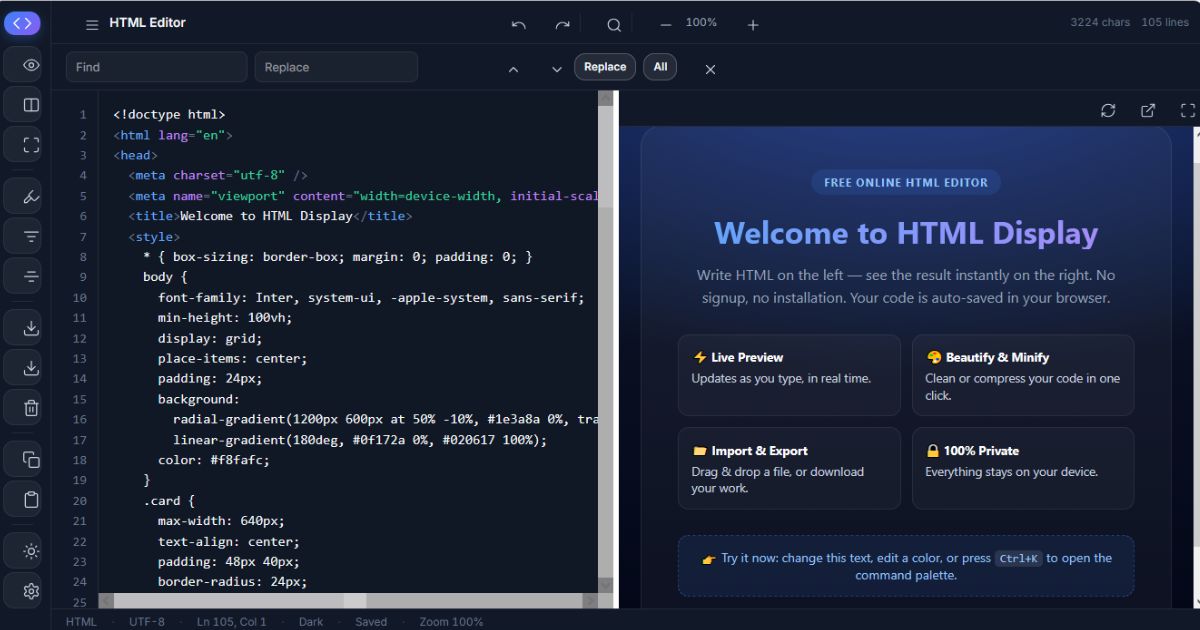
How to Use This HTML Editor Online
Start typing in the editor on the left, or paste existing code, the preview on the right updates as you type. You can also drag & drop an .html file straight into the editor to open it instantly. When you're done, download your work as a ready-to-use HTML file with one click. Press Ctrl+K to open the command palette and access every feature from your keyboard.
Key Features
- Instant live preview : see your HTML rendered in real time, with a resizable split view and fullscreen mode.
- Beautify & minify HTML : clean up messy code or compress it for production in one click.
- Import, export & download : open local HTML files by drag & drop and save your work anytime.
- Auto-save & dark mode : your code, theme and settings are remembered between visits.
- Search & replace, undo/redo, syntax highlighting : a real code editor, right in your browser.
- 100% private : everything runs locally. Your code never leaves your device.
Who Is HTML Display For?
This HTML playground is perfect for students learning HTML who want immediate visual feedback, developers who need a quick sandbox to test a snippet without opening an IDE, bloggers and marketers checking embed codes or HTML email templates, and anyone who needs a lightweight alternative to CodePen or JSFiddle to simply view and edit HTML fast, on desktop, tablet or mobile.
Frequently Asked Questions
Is this HTML editor really free?
Yes, HTML Display is 100% free, with no account, no trial and no limits. The site is supported by occasional affiliate partnerships, which never affect how the tool works.
Is my code saved? Where is it stored?
Your code is auto-saved every 2 seconds in your browser's local storage, on your own device. Nothing is sent to our servers. Reopen the page anytime and your work will still be there. Clearing your browser data will erase it, so download important files.
Can I test CSS and JavaScript too?
Yes. Write a complete HTML document including <style> and <script> tags, the live preview renders CSS and runs JavaScript just like a real browser page, safely sandboxed.
How do I open an existing HTML file?
Drag & drop your .html file anywhere on the editor, or use the Import button in the sidebar (Ctrl+O). To save your work, click Export / Download (Ctrl+S).
What's the difference with CodePen or JSFiddle?
Those are full development platforms with accounts, collections and social features. HTML Display focuses on one thing: viewing and editing HTML instantly, with zero friction. No signup, faster loading, and complete privacy.
Does it work on mobile?
Yes, the editor is fully responsive. On mobile the preview appears below the editor, and all features remain available through the menu.